RiiviveTube WAD Installation Failed
Problem: The WAD won't install or you get an error from the WAD Manager.
- • Make sure you're using a compatible WAD Manager (try YAWM ModMii Edition)
- • Verify you downloaded the correct WAD for your region (Europe, USA, or Japan)
- • If you have the original YouTube channel installed, uninstall it before installing RiiviveTube
- • Ensure your Wii has enough free space in internal memory
- • If using a pre-patched WAD doesn't work, try patching your own WAD with our patcher tool
RiiviveTube Won't Load
Problem: The YouTube channel launches but shows an error or blank screen.
RiiviveTube Videos Won't Play or Crash
Problem: Videos won't start playing or the app crashes when selecting a video.
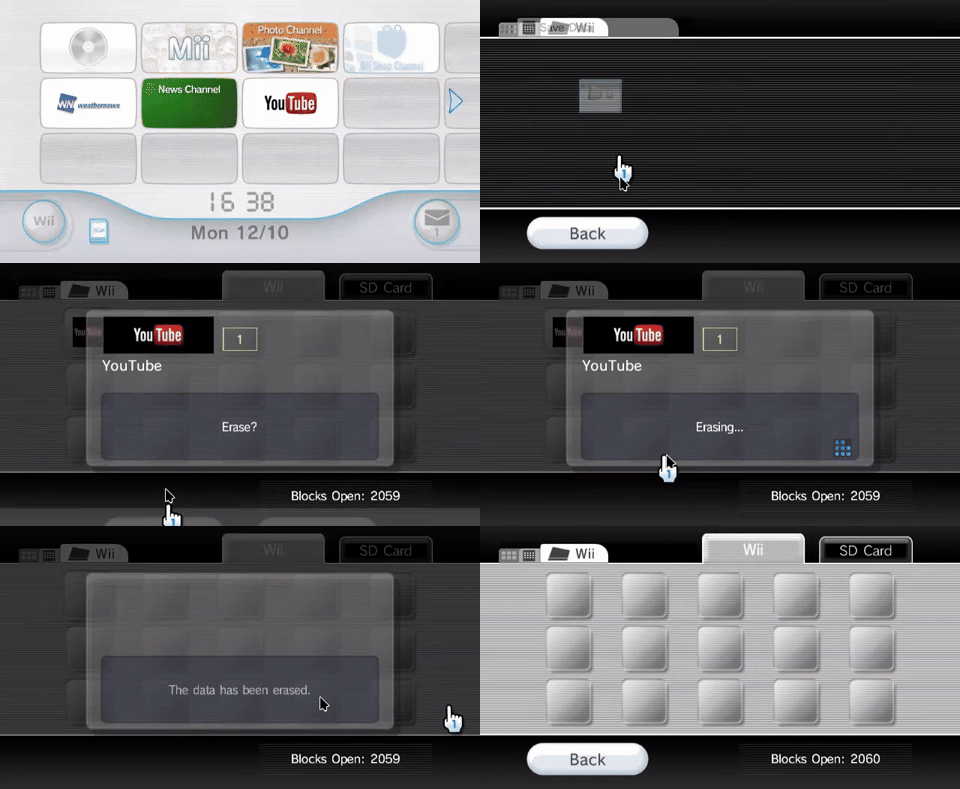
- • Try clearing the YouTube Save-Data (Data Management → Save Data → Wii → YouTube → Erase)
- • Livestreams and age-restricted videos aren't supported. Please try a different video
- • Make sure you have enough free memory (try freeing up space)
- • Expect longer loading times for videos over 30 minutes
- • Try restarting the YouTube channel and attempting to play again
RiiviveTube Patching Errors
Problem: Errors occur during WAD patching or installation process.
- • Re-download the patcher from GitHub
- • Try downloading from NUS if your own dumped WAD is not working.
- • Try using a different computer to patch the WAD
- • Make sure you're using Python 3.11 or higher (if patching manually)
- • Disable antivirus software temporarily, it may interfere with patching
RiiviveTube Playback Problems
Problem: Videos load slowly, buffer constantly, or disconnect frequently.
RiiviveTube YouTube Channel Crashes or Freezes
Problem: The YouTube channel constantly crashes, freezes, or becomes unresponsive.
Patching Your Own RiiviveTube WAD
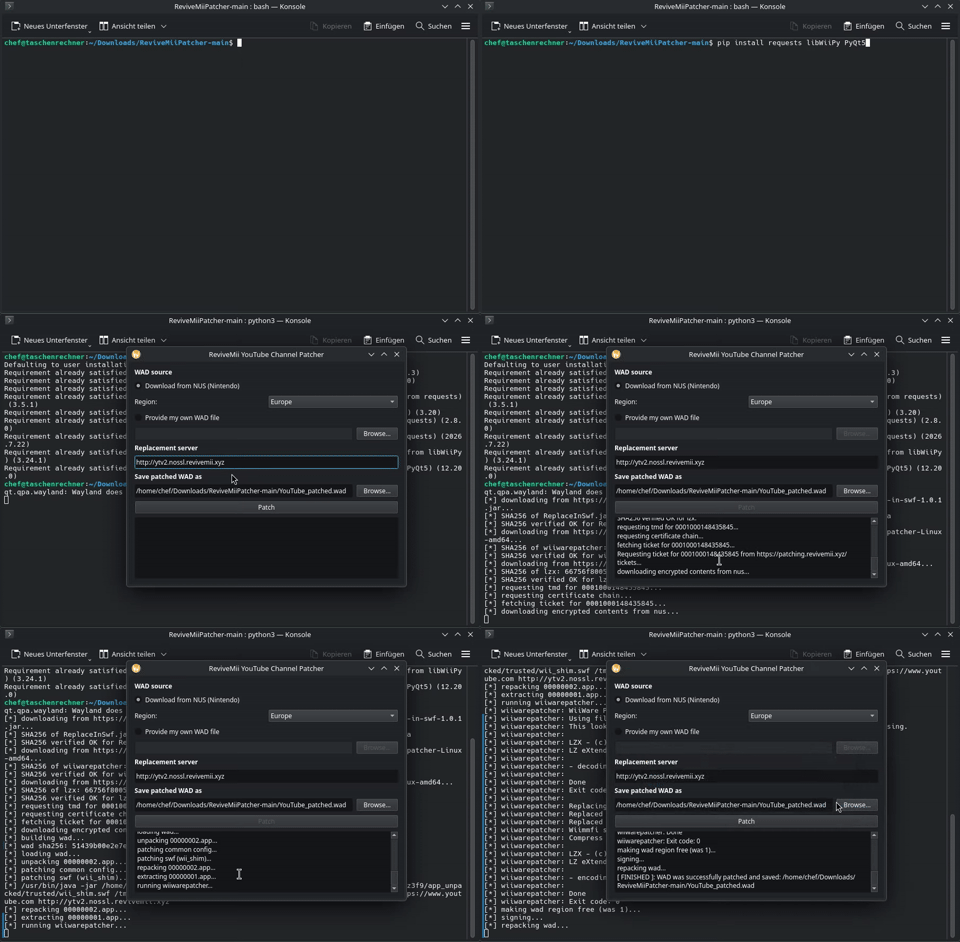
Problem: You want to patch your own YouTube WAD but don't know how.
Requirements:
- • Original YouTube WAD file (from your Wii backup)
- • Python 3.11 or higher installed
- • Our ReviveMii Patcher
Steps:
- • 1. Download the patcher from the GitHub releases and unpack the ZIP
- • 2. Run 'pip install requests libWiiPy PyQt5' and 'python3 main.py'
- • 3. Select your Region (and if you are running your own Instance, your Instance URL)
- • 4. Click Patch
- • 5. Install the patched WAD using your WAD Manager
Still Having Issues?
If none of the above solutions work, join our Discord community to report bugs and get direct help from the team:
